
Dashboard and local API
Goal
Run the one production Dashboard, understand its views and status labels, and use the local API within its security boundary.
Prerequisites
- a verified managed release
- a supported local browser
- at least one project for project-scoped operational views
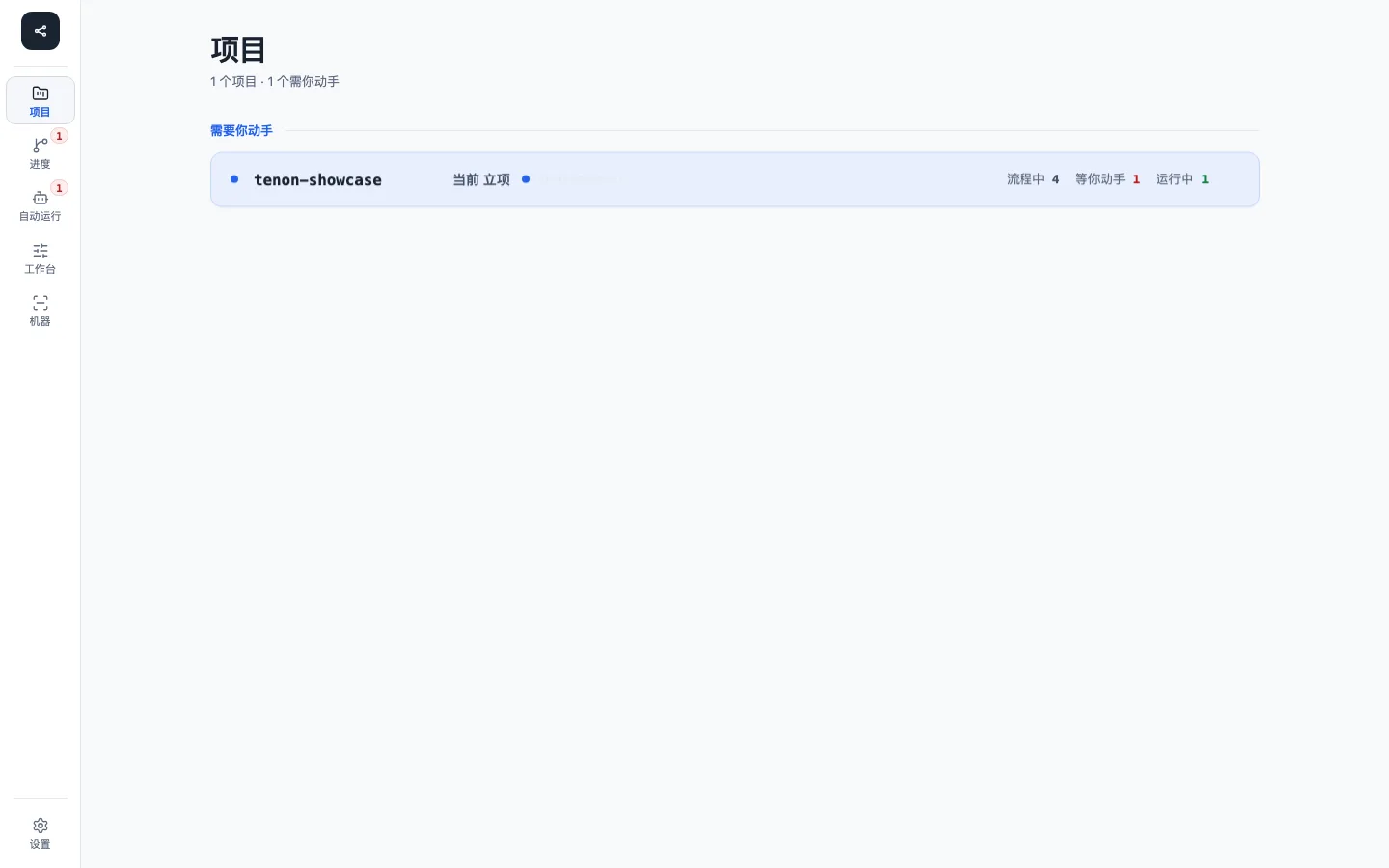
The project view prioritizes work that actually needs help. Official screenshots use a sanitized showcase project and contain no user directory, credential, or private business data.
Start the Dashboard
tenon dashboard --open--open implies a managed background start and waits for a compatible health response before opening the browser. If a Dashboard is already running it does not start another: it asks that server to open your browser.
Other supported forms:
tenon dashboard
tenon dashboard --background
tenon dashboard --port 19765 --open
tenon dashboard --dry-run
The default production entry is:
http://127.0.0.1:18765/One server owns the built SPA and /api/* on the same origin. Vite's separate development port is not a second production frontend.
Signing in
The Dashboard serves nothing to a caller that has not signed in: GET / answers 401 with a short sign-in prompt, and every /api/* read or write answers 401 until the request carries a session cookie. Only /api/health and the static /assets/* stay public. There is no token file to read and nothing in a response that can be exchanged for access.
tenon dashboard --open is how you sign in. The server mints a one-time login link (valid for 2 minutes, usable once), opens it in your default browser itself, and the page trades it for an HttpOnly; SameSite=Strict session cookie before redirecting to /. The link is never returned to the command that asked, so a script that merely runs the command cannot sign in. Reloading keeps working through the cookie; a session lasts 12 hours idle or 7 days at most and lives in server memory, so restarting or upgrading the server signs you out.
| Situation | What to do |
|---|---|
| First visit, expired session, or after a restart/upgrade | tenon dashboard --open (the open page shows the same prompt and command) |
| A browser window that says "signed out" | run the command again; the old tab can be closed |
| No desktop session (SSH, container, WSL without a browser) | run tenon dashboard --port 19765 in a terminal (any free port): the foreground server prints a one-time login link, which you open in a browser that can reach that port |
| A script or test harness that starts its own server | set TENON_DASHBOARD_PRINT_LINK=1; the server prints the link to the stdout of the process that launched it, and only there |
The link is printed only to an interactive terminal or when the launcher opted in with TENON_DASHBOARD_PRINT_LINK=1; a managed background server prints nothing. Sessions are per port: two Dashboards on different ports on the same machine do not sign each other out. The cookie belongs to the host in the link, which is always 127.0.0.1; typing http://localhost:18765/ yourself is a different site to the browser and shows the sign-in prompt again.
Views
The five operational destinations in the primary shell (?view= ids in order: workspace → workflow → projects → library → skills; the old ids progress and workbench redirect) are:
- Workspace — tasks by category (All · Needs you · Running · Ended); the detail shows the stage, what blocks it, the next step and, per step, the inputs and outputs that really happened; an Ended card carries its result (Finished, Escalated or Terminated), and All also includes ended tasks after the running ones
- Workflow — Workflows, Tracks, stages, skills and gates
- Projects — per project, the enabled agent clients and, for each, its project-level and user-level instruction file (
AGENTS.md,CLAUDE.md,GEMINI.md), plus creating a project from an existing or new directory - Library — the instruction template library: built-in blocks synced from the release payload, and your own copies; and the agent library, grouped by role with source and version, where custom and project agents edit their body and official ones copy as custom (registering happens in the terminal with
tenon agent new) - Skills — source, commit, license, update time, and status per Skill, read-only
The Settings panel contains theme and language controls. AFK, machine diagnostics, and Host Plan remain CLI/API capabilities; their historical dashboard deep links are no longer primary views. Host Plan previews are zero-side-effect and adapter previews use --target ..
The product Overview at /?view=overview is a separate brand-level read-only view, not an operational destination and not the installed default.
Optional surfaces are advertised by snapshot capability flags. A disabled capability is not an empty success state.
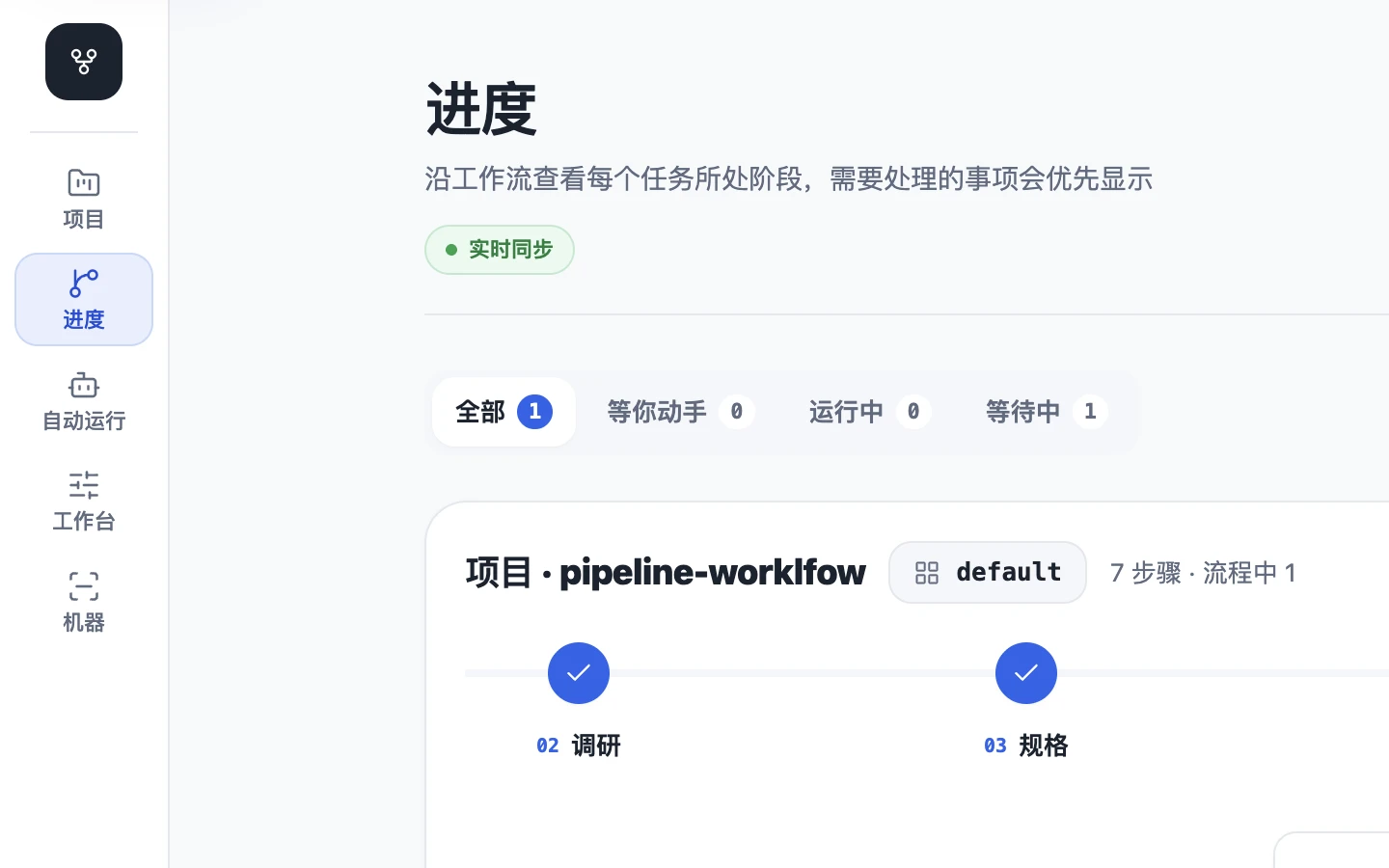
Progress follows the effective Workflow. Display state and execution provenance are separate, so a task can be running in a terminal without being presented as unattended automation.
Workflow editor
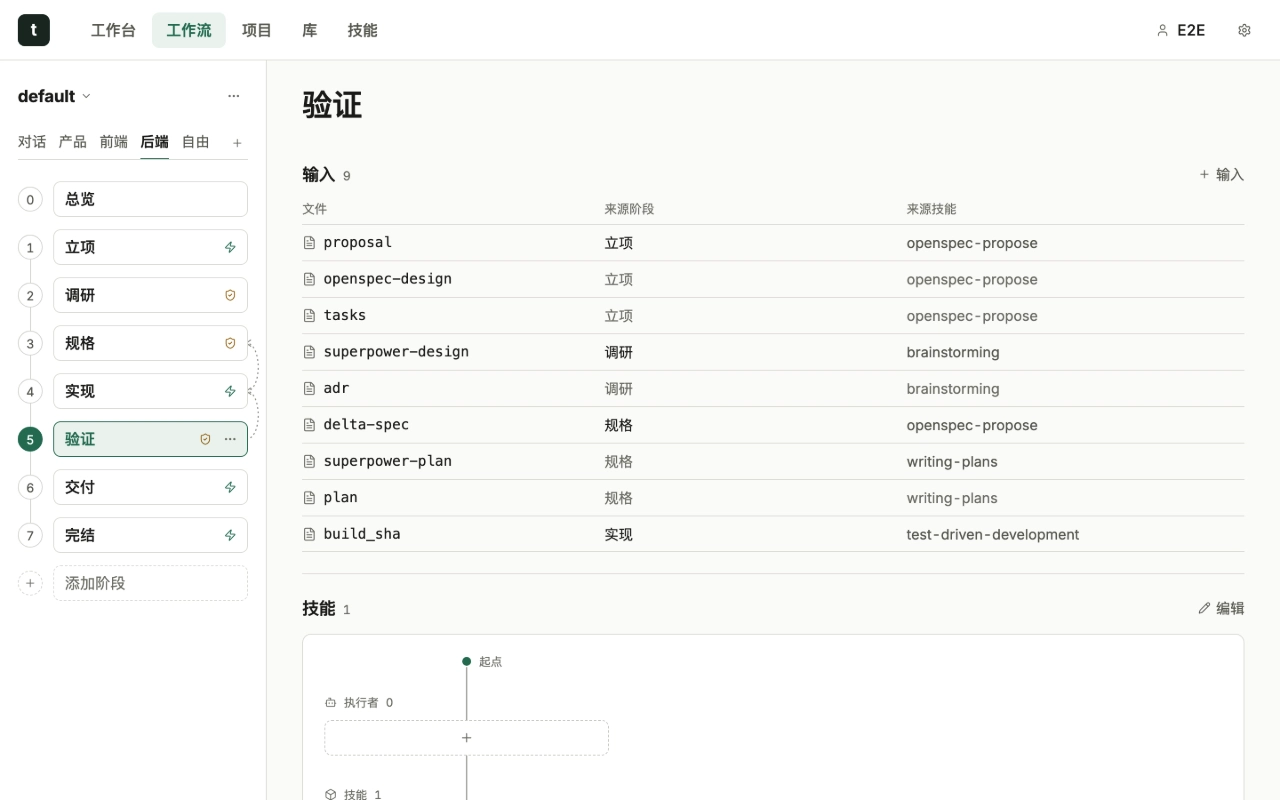
The workflow editor lists a Workflow's Tracks and stages; each stage page shows its skills, gate, and test policy. There is no input or output table: a Workflow does not declare the documents of a step, so the page neither shows nor edits them (the Workspace shows what a task really produced). Track settings edit the Track's spec (OpenSpec or none) and its routing keywords; exclusions, priority and automation stay in the YAML. Under a gate, the editor lists the step's leave conditions read-only, one per line (for example “implementation review passed”, “tasks through this step checked”, “dependencies ended”, and “Required output <path>” for each required-output guard). The settings menu holds the theme and language controls and never changes the canonical Workflow state.
Workspace inputs and outputs
For the selected task, each step lists what actually happened, read live from the task's step-output records (the current step is compared with its checkpoint at read time; an ended task keeps showing the records it was archived with):
- Inputs: file · source stage · source skill (or “Unknown”) · Read or Unread. These are the documents the direct upstream step produced, which the step must read before it can be left.
- Outputs: file · Added, Modified or Deleted · source skill (or “Unknown”). Code and other non-document files appear here too.
A step with nothing to show says “No inputs for this step” or “No outputs for this step yet”. A task created before the upgrade shows its document ledger in the same shape: each registered document is an output of its owner step with the producer as source skill, and its reads are inputs with their read state. The data is the stepIo of GET /api/change/:name/orchestration?root=<project root>: stepIo[<step>] = { inputs, outputs, required }, where a file is { path, change?, skill, fromStep?, read? } (skill is null when unknown) and required lists { path, produced } for the step's required-output guards. Paths are relative to the project root; the response carries no digests, visit ids or absolute paths. The former io field of this response is gone, and the Workflow API (GET /api/workflows/:name and its Track views) no longer returns effectiveIo.
Workflow overview
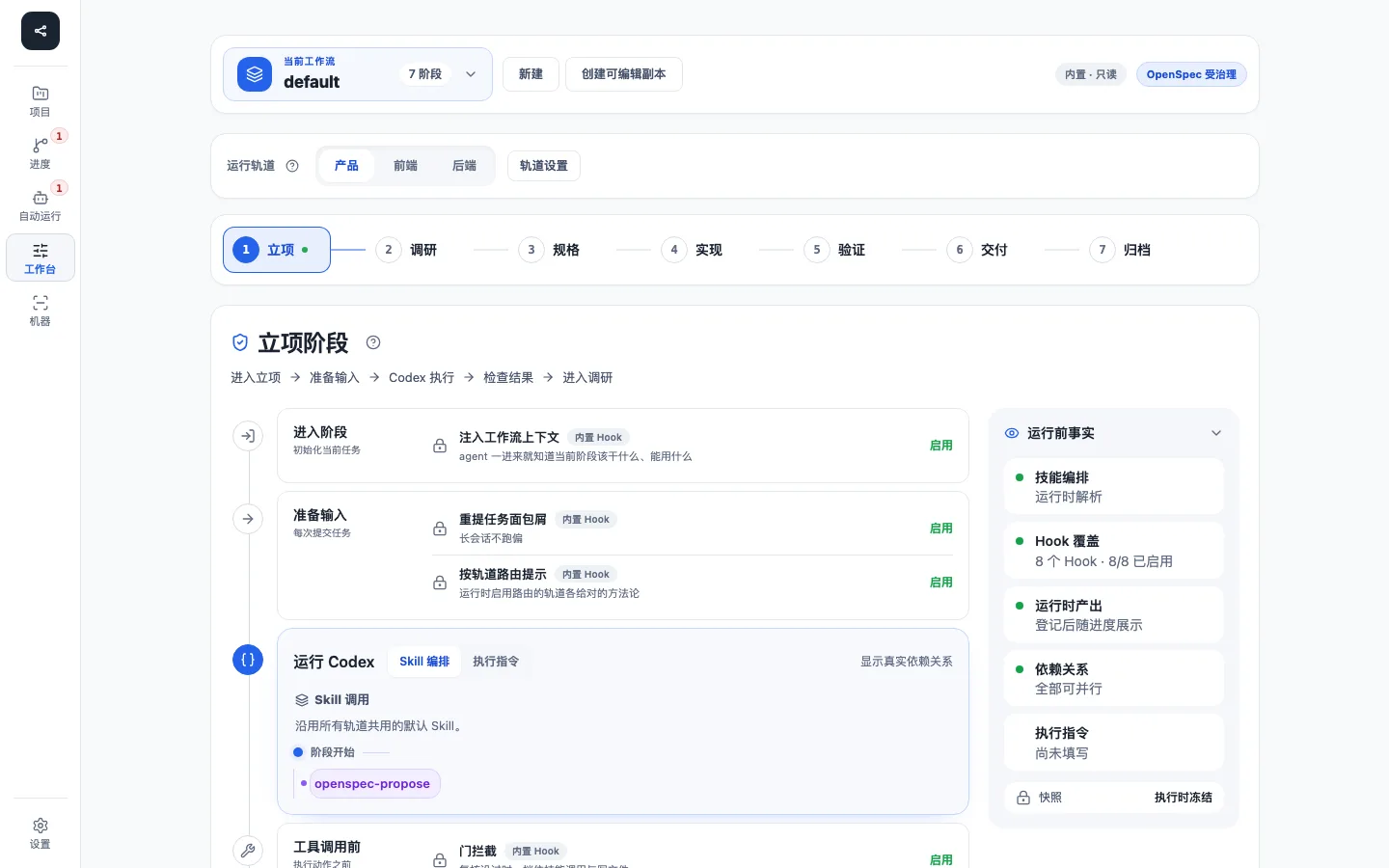
The overview canvas places Tracks, each Track's step DAG, and the skills each step declares on one page. The default Workflow, custom Workflows and each Workflow's Tracks come from the same effective plan.
Projects
The Projects page lists registered projects only. For the selected project it shows the agent clients the project has enabled. Clients that read the same project file (for example several clients reading AGENTS.md) share one row. For each client you edit either its project-level or its user-level instruction file. The enabled set belongs to the project and lives in <project>/.tenon/clients.json:
{ "schema": "tenon-clients/v1", "enabled": ["claude", "codex"] }The file is meant to be committed; .tenon/.gitignore only ignores each user's local/ directory. When the file is absent, the set is inferred from existing instruction files (CLAUDE.md → claude, AGENTS.md → codex, GEMINI.md → gemini). Opening the page or previewing never creates files.
GET /api/projects/clients?root=<registered root>→{ "enabled": [...], "source": "file" | "inferred" }; a malformed file answers409 clients-file-invalid.POST /api/projects/clientswith{ "root", "enabled" }replaces the whole set and answers{ "enabled": [...], "source": "file" }. Only known client ids are accepted (400 unknown-clientlists the rest), ids are deduplicated and sorted, and the file is written atomically. The request needs a declared identity (412 user-missing) and appends one audit row. A concurrent external edit answers409 clients-file-changed.
Skills
/?view=skills lists the Tenon-owned Skills and every upstream Skill declared in skills/sources.yaml: source repository and directory, installed commit (with a compare link to the previous commit when it changed), license, update time, and status. It reads GET /api/skills/sources, which projects the skills/skills.lock.json written by setup/update plus the last fetch outcome. The page performs no network access and starts no installation.
Tests
The Dashboard only reads test data and edits each workflow step's test level; it never runs or registers tests (tenon test ... does). The project page has a client/tests segment (catalog suites with their test class, the effective level definitions, baselines per machine profile, known failures), the workbench task has a tests tab (requirement matrix by test class, scenario trace, test files marked as auto-claimed or orphaned) with a run drawer (failed cases, artifacts, coverage, benchmark against baseline, logs), the workflow page picks each step's level (none, plan, changed or full) with a single choice, and the library lists read-only test templates. The info icon next to the level choice names the file that defines the levels (levels in .tenon/tests/catalog.yaml) in its tooltip; a step that still holds a legacy test_policy shows a read-only summary until you pick a level, which replaces it. When a level does not ask for scenario mapping the trace shows one summary line instead of an "uncovered" row per scenario.
GET /api/tests/catalog?root=→ the parsed catalog (missing,invalidwith line-numbered issues, orok), the effectivelevels(plan,changedandfull, each marked as coming from the catalog or from the built-in default), the known failures and the latest result per suite.POST /api/workflows/:nameacceptsteston a step and answers400when a step carries bothtestandtest_policy.GET /api/tests/baselines?root=&suite=→ baselines per machine profile with history.GET /api/tests/plan?root=&change=→ the task's test plan state (missing,tampered,ok).GET /api/tests/records?root=&change=[&suite=]→ v2 run records, newest first, with the hash-chain state; records off an intact chain are flaggedtrusted: false.GET /api/tests/record?root=&change=&user=&run=→ one run with failed cases, coverage, benchmark metrics, services and the per-file artifact index (presentsays whether the local file still exists).GET /api/tests/artifact?root=&change=&user=&run=&path=→ one file inside that run's artifact directory. The path must be relative and free of.., the target must be a regular file whose real path stays inside the run directory (checked again on the opened inode), and files over 64 MiB answer413. Images and video are served inline; zip and HTML are attachments only. Every response carriesnosniff,Content-Security-Policy: sandboxand aContent-Dispositionwith the file's original basename (attachment; filename="trace.zip"orinline; filename="home.png"; a non-ASCII name adds an RFC 5987filename*=UTF-8''…), so a saved download keeps its name instead of arriving asartifact.zip.
Each change in GET /api/snapshot also carries testPolicy (the verdict of every stage that declares a test level or a legacy policy; an entry derived from a level carries level: { name, required, touched, source }), testPlan and testUser. Every testPolicy entry lists the catalog's project-wide not_applicable declarations as notApplicable: [{kind, reason, approved}] (approved: false = still waiting for the review confirmation), so the Tests tab shows an approved kind as "not applicable" rather than missing. The Dashboard itself reads the lighter list tier described under "Local API" and fetches this per-change evidence from GET /api/change/:name/snapshot when a task is opened.
Status semantics
| State | Meaning | First check |
|---|---|---|
| Running | An active host session or AFK worker owns current work | inspect run/worker details and recent activity |
| Waiting | A review, user interaction, queue admission, or gate is pending | inspect exact pending interaction and Change phase |
| Queued | AFK work is admitted but no worker is currently running it | inspect AFK readiness and queue |
| Blocked/failed | A guard, verification, worker, or operation failed | read the recorded reason before changing state |
| Ended | The task was archived with a result: Finished, Escalated or Terminated | inspect final evidence under Ended |
“Waiting” is not a synonym for “broken.” The UI must not infer running merely from an unfinished Todo.
Read-only diagnostics
tenon status <change-name> --json
tenon document status <change-name> --json
tenon afk status <change-name> --json
tenon doctor --json
HTTP checks:
curl --fail http://127.0.0.1:18765/api/healthHealth is the only API read that needs no session. It includes release and state-scope identity; a process merely listening on 18765 is not enough to prove it is the correct Dashboard. The other reads (/api/snapshot, /api/host-targets, /api/host-target-plan?host=codex&operation=setup, ...) answer 401 to curl by design; use the CLI equivalents above, or the signed-in browser. It also reports channel: stable for a release install, dev for a source development install, in which case commit is the 7-character commit and displayVersion is <version>+dev.<sha7>; version itself never changes.
Server log
The server mirrors its stdout/stderr into <state>/logs/dashboard.log (rotated by size, three files: the current one plus .1 and .2, 1 MiB each) and records unexpected 500 responses as [dashboard-server] 500 <method> <path>: <message> (the query string is never logged). Credentials, cookies and one-time login codes are redacted before a line reaches the file. Read it with tenon logs [--follow] [--lines N]; tenon support bundle packages the recent part, redacted again for sharing.
Local API
The loopback API exposes current health/snapshot/SSE plus local operations for projects, Changes/runs, Workflows, Tracks, hooks, automation, loops, AFK, configuration, and diagnostics. The Dashboard does not create tasks: there is no POST /api/changes, no router preview and no write endpoint for the skill matrix. A task starts from /tenon in the agent (which assesses first) or from tenon init.
The Host Plan endpoints are strictly read-only. They accept only registered Tenon hosts and the setup or update operation, return host-target-plan/v1, and never execute the displayed command. Native-host plans are user-scoped; adapter-host plans use the current project directory (--target .) instead of a shell placeholder.
New projects are created through a step-by-step dialog (location, templates, resources, clients, confirm). Folders are chosen, never typed: POST /api/fs/choose-folder opens the operating system's folder dialog on the machine running the server (osascript on macOS, PowerShell on Windows, zenity/kdialog on Linux) and answers {ok:true,path}, {ok:false,cancelled:true}, or {ok:false,unavailable:true}; only one dialog is open at a time (409 picker-busy). When no dialog is available the page switches to an in-page browser backed by GET /api/fs/list?dir=&hidden=1, which lists sub-directories only and, unlike other reads, also requires the token. POST /api/projects/create/stream takes the same body as POST /api/projects/create and reports each step (plan, step, done, failed) as text/event-stream; an optional clients list is recorded in the project's .tenon/clients.json (tenon-clients/v1). In the create body, instructions.references writes CLAUDE.md / GEMINI.md as a single @AGENTS.md import, instructions.append keeps an existing file's text and appends the new content, and git_init initializes an existing folder that is not a repository yet. An optional design_seed names a design-md entry of the resource catalog: the dry run answers design: {resource, exists}, and execution runs a design step before registration that fetches that DESIGN.md into the project root with the same logic as POST /api/design/seed; an existing DESIGN.md is never overwritten (the step is skipped).
The production server negotiates gzip for compressible generated assets and returns Vary: Accept-Encoding. Clients that decline gzip receive the original bytes; API JSON remains no-store.
The snapshot comes in two tiers. GET /api/snapshot (no view) is the full snapshot: every change with its documents, skill and agent runs, tests, test policy, the rules' policy block and all .pipeline.yaml fields. GET /api/snapshot?view=list and GET /api/stream?view=list are the tier the Dashboard loads: the same rows without that per-change evidence (fields is narrowed to workflow and automation, todo to stage statuses, workflowRules to the plan-derived part), each change stamped with a rev, and the sub-trees many changes share (workflow rules, current-step readiness, stage statuses, owner/creator references) written once per project in a shared table that a change points at by integer. The evidence of one change comes from GET /api/change/:name/snapshot?root=<project root>: the same object the full snapshot holds for it, plus rev. A list row's rev moves whenever any input of that change moves, so a reader re-reads the detail exactly when its rev changes. With 30 projects x 30 changes the list body is about 0.6 MB (about 21 KB gzipped) where the full snapshot is 11 MB.
Ended tasks are listed apart from the changes: each project carries ended, one summary per directory under openspec/changes/archive/ (name, workflow, track, result, end time, PR link, owner; newest first, with endedTotal when the list is truncated). Summaries are read only, cached by directory identity and not part of live change detection. The detail of an ended task is GET /api/change/:dir/snapshot?root=<project root>&archived=1, where :dir is the archive directory name; it is read-only.
The list stream sends one full snapshot event and afterwards a snapshot-delta event holding only the projects whose serialized bytes changed, plus roots (the registry order) so removed projects disappear; a stream without view=list keeps re-sending the whole full snapshot as snapshot events.
A step-exit readiness blocker (readinessByTransition[...].blockers[]) carries the human sentence in message (the same text as the CLI, shown only as a tooltip) and the machine-readable parts in code, source and the optional subject, state and count: subject is the blocked object (document kind, or the input path for the input-unread blocker of a new Change, skill token, test display name, the reviewer whose host does not match), state its state (documents missing|stale|unread, skills not-run|unrecorded, inline tests running|missing|stale|failed, test-policy blockers integrity and diff-unavailable which name no single test and so carry no subject, reviewers wrong-host with code: reviewer-wrong-host) and count the number of unchecked tasks.md items. The Dashboard labels blockers from code and these fields only and never parses message; a blocker without them is shown as its full sentence. tenon status --jsonexits[].blockers[] has the same fields. Reviewer blockers are also projected as an agents-incomplete blocker (agents[] with agent and reason, where reason is the kernel blocker code such as reviewer-wrong-host).
The snapshot is cached per project. Each project's list build, full build and change details are keyed by that project's input fingerprint (state, tasks, documents, step-output records, test-record directories, archive, git HEAD, terminal activity, and the viewer identity), so a change in one project rebuilds that project only. An unchanged build is reused, with its original generated_at, for at most 30 seconds; at most four aged-out projects are refreshed per read so a cold start does not expire into one large rebuild. A write request drops the projects it names (root in the query or JSON body) once it settles, and before it runs when the query names them; a write that names no project drops everything. Concurrent readers share a single build. /api/snapshot, /api/change/:name/snapshot and the AFK snapshot/log views share these builds; the snapshot and change responses send an ETag, answer a matching If-None-Match with 304, and are gzipped for clients that accept it.
Every request except /api/health and /assets/* requires:
- loopback/local Host validation (reads included, so DNS rebinding reads nothing);
- a live session cookie from the sign-in above;
- browser Fetch-Metadata sanity: a request marked cross-site is refused, and a write whose
Originis not the Dashboard itself is refused.
Mutation requests additionally require:
- the write token, which is embedded only in the page served to a signed-in session (
GET /without a session contains no token); - JSON content type;
- a bounded request body;
- a trusted registered project root where filesystem access is involved.
Approving a review in the Dashboard also needs proof that a person is present: the page asks you to confirm a second time, and only then requests a single-use nonce (POST /api/change/<name>/decisions/presence, bound to your session, the change, the review ref and revision, valid 30 seconds) that POST /api/change/<name>/decisions must present in X-Tenon-Presence. tenon review acknowledge in the terminal is unchanged.
Two answers belong to the verification round limit (see the CLI reference). When the rounds of a limited step are used up, POST /api/change/<name>/transition for a return edge answers HTTP 409 with code: "rounds-exhausted"; the body carries step, event, current, max, source and error, and forward edges and the abandon edge are not affected. When the review request froze remaining reviewer blockers that still wait for acceptance, POST /api/change/<name>/decisions answers HTTP 409 with code: "residual-pending" and leaves the receipt pending: the Dashboard does not list those blockers, so the user confirms in the terminal, with the approval phrase ("确认继续", "继续执行") or tenon review acknowledge.
Use the same-origin Dashboard for ordinary mutations. The API is a local integration surface, not a public hosted or multi-tenant API, and no independent long-term API version promise is made here.
Expected result
The health endpoint identifies the active managed release/state scope, the SPA loads from the same origin, and Progress uses the Change's effective Workflow steps.
Verification
tenon dashboard --dry-run
curl --fail http://127.0.0.1:18765/api/health
In the browser, confirm that lightweight, heavy-Track and custom Changes show their own step shapes rather than one hard-coded Todo, and that a finished or terminated task appears under Ended with its result.
Common failures
Port is occupied
Run the health check first. A compatible managed instance may be reused; an old managed release may be preempted. For an intentional alternate port:
tenon dashboard --port 19765 --openThe page says "Sign in" / requests return 401
The session is missing or gone (first visit, cookie expired, or the server was restarted or upgraded). Run tenon dashboard --open. If it reports that it could not open a browser, see the headless row in Signing in.
Vite loads but writes return 401
The development server does not serve the signed-in page, so it never receives the write token. Sign in on the packaged tenon dashboard first (its session cookie is sent to the Vite port too, which makes reads work); for writes use the packaged Dashboard.
UI is waiting forever
Inspect review/interaction markers, current phase, host-session activity, and AFK status. Do not delete markers or edit canonical state by hand.
Next action
Read troubleshooting or security model.